Thursday, June 30, 2011

The Google+ Killer Feature?

I thought I would share my initial thoughts on Google+ along with the rest of the web. If you don't know what it is, here's a introduction video created by Google:


I think the best way it's been described is this: "It's not Facebook, but shares many similar features to Facebook." This xkcd comic sums it up pretty nicely:


My first experience would agree with this. Google+ is like Facebook in that you can give an update, share photos, videos and chat with friends. Google+ does some of those things better too: video group chat looks awesome for example. It also has a couple features missing in Facebook: Sparks, which let you create your own stream of interesting content from the web (really nice right now since I don't have 100's of friends on Google+ yet). The UI also looks nice - a blend of Facebook and Friendfeed (which is now owned by Facebook).

So I've been using it for a day and like it, but that's probably because it's something new and shinny. Is it something that must be incorporated into my life? Not yet. I mean, the big thing missing is the critical mass of friends to make sharing worth while. Duh. If I have something I want to share, I'm going to go where my friends are at... and currently they're on Facebook. The only way most people are going to switch is if Google can offer them something better.

What is that something better? That killer feature?

One of the big features Google is touting is "Circles" - friends list with fancy animations. The idea is to make "creating friends lists" so easy that people will actually do it. I'm probably not a great person to talk about this because I actually maintain lists within Facebook and filter with them regularly. But, from what I hear, the "average" user doesn't do it. The benefit of having "Circles" is that you'll be able to selectively share with only people who you know will care (or on the flip side, NOT share with people who you don't want to know about your exploits).

So here's the rub for me: When I decide to publicly share something, I go everywhere: Facebook, Twitter, Buzz (yeah, I'm THAT guy), and LinkedIn. I will also email it to people I know are not on any of those services (like my dad). If I want to selectively share something with a small group, I email it. Did you catch the subtly of the situation? "Circles" is actually competing against email - not Facebook. Email: no character limits, multimedia, BCC, CC, notification systems, on every device, checked regularly.

In the end, I'm going to use "Circles", but that's because I'm THAT guy who organizes everything (even my Google Contacts are sorted into groups). I think the default for most people will be to share publicly only.

Another potentially cool feature is the Group Chat. You can start up your camera and be available to chat - then others can join you at will. This, in theory, means you don't need to schedule out every single chat. I'm interested to see how well it performs with multiple people because all other options I've tried have horrible lags.

That's a couple of the highlights.

Here's my biggest question: What is Google+'s killer feature? What would make me want to come back and use the service? What is Google+ offering that no other social network is offering? How can Google incorporate all their other services to create something truly sticky?

One example I saw is with Google's +1 button: you can now filter you Google Analytics by +1 visitors. This gives site owners more data to make better site decisions. Every site owner should be excited about this! I'm still not sure what the value is to the visitor clicking the +1 button, but I'm willing to bet there will be a lot more +1's now. Perhaps the +1 buttons will be more tightly integrated with Google+ stream: For example, I +1 a page and friends can comment & +1 the page.... of course, which "Circle" does this get shared with?... oh boy, this got complicated fast...

Is it good enough for Google to merely mirror Facebook's features while marginally improving each part? Probably not. Facebook already has all my friends, and so I'll put up with a lot of Facebook shenanigans before moving on. Perhaps, they can co-exist like Facebook, Twitter, and LinkedIn, though it's unclear which group this would be for. Selective sharing? Again, email works pretty well. Google needs to clearly identify who would benefits from using their service.

Google claims this is just the first step of Google+. That over time they will be incorporating more and more of their products. Perhaps they'll be able to weave in enough of their products that it won't necessarily be one killer feature (like... being able to share on behalf of others... Or the ability to easily search past updates), but it's a whole system that has at least a little bit of value for everyone. Not just additional traffic for site owners, but stats, SEO recommendations (G+O?),  social adwords (+1's = credits and/or discounts; display friends who've like it within Adwords). For users, not just sharing into a huge stream - smart filtering, smart discovery, smart ads.

Google also needs to find a feature (or two) that can only be done on Google+: share gDocs, gCals, search results? Something with Youtube and Picasa is a must. Incorporating Reader to make sharing easy: see +1's and comments right in Reader.

Google+ could also become available to Google Apps users to create a Yammer-like service for organizations.

Knowing Google, all of these, plus more, have been thought of. Now it's a matter of engineering resources and paying attention to customer's demands. Google+ isn't perfect, but it stands a chance of becoming a big part of the web.

Monday, June 27, 2011

Music Library Stats

For the fun of it, I tried copy & pasting my iTunes library into Excel. In wonderful delight, I found that it sort of worked. Well, I couldn't stop there. I created a pivot table and whipped up these views. First, here are some stats:

Timeframe: September 2010 - Yesterday (basically, since I switched to Mac)
Number of Songs in library: 829
Total number of songs played: 9,084
Total play time in library: 2.2 days
Total Computer Storage required: 4.25 GB
Average Times a song is played: 11

Cool. Let's check out a distribution:
(PS. This is my first time using Excel on my mac for something like this. It was a fun experience.)


First, every song has been played at least once, with most number of plays being 56. Second, there's a huge spike at 10. That isn't random - let me explain. iTunes has a feature called "iTunes DJ" where it loads in songs automatically, semi-randomly, playing "popular" songs more. Popularity is determined, as far as I can tell, by the rating you give it (stars) and by how many plays it has. What this means is that if you play a song a lot, it'll get played more and more and more. Furthermore, a rating of 1 star is more "popular" than not being rated at all (0 stars).

So here's what I do: First, I rank every song as 3 stars, and then change it over time. This way 1 star really is the worst.

Second, I created a smart playlist that only contains songs that have less than 10 plays. That means, when a song hits 10 plays, it leaves the playlist. I choose this playlist all the time when using iTunes DJ (which is a majority of the time). As a result, I have a huge spike at 10 because the song exits the playlist and doesn't get played again for a while. Once all my songs are at 10, I'll probably move up to 20 and capture a significant chunk of my songs again.

Next, lets look at genres:


The majority of my library is Christian and soundtrack (which if there were sub-categories, Disney would be the largest). Pop/Rock, Rock & Holiday also make a good showing. I also have one genre named "genre". Clearly a tagging mistake I should fix.

Finally, let's look at some specific artists. The first table is sorted by the number of songs in my library by that artist. The second table is sorted by the number of times I've played a song by that artist.


Well, my mom would be proud to see Kenny Loggins in the #1 slot. There also appears to be a pretty high correlation between the number of songs in my library and the number of times played - only 2 from each list (the *) are not in the other list. Also notable, Hillsong United is a recent addition to my library, so I'm not surprised to see the low play count.

That's it. There's your Monday morning stats. :)

By the way, my #1 played song is "I Will Follow" by Chris Tomlin at 56 times.

Thursday, June 23, 2011

The Secret To Reaching Zero Inbox Email

Email is the bane of many people's lives. Not because it's inherently bad, but because inboxes tend to get overwhelmingly filled in a never-ending battle of communication. I used to be in that camp - it seemed no matter how often I checked my email, I could never get ahead of the game.

Today is much different. My personal email inbox rarely gets above 10 and most days finishes at 0. My work email inbox isn't as clean, usually hovering around 10-15 emails, peaking around 25 and reaching 0 once a month. Often when I share this stat, most people ask how I do it, and I thought I'd share my response. It's a 3-prong approach that works well for me.

Less Frequently, For Longer Periods of Time
I stumbled across this trick when I did my media fast inspired by the 4-hour work week. I used to have my email open all the time. You'd think that would help, but it's actually counter productive. Here's what would happen: I would flip to my email, look for 2 seconds, and flip away. I'd flip back, look for 30 seconds to read something and then flip away. I was never actually focused on my email long enough to digest and respond properly. As a result, I really only gave myself time to quickly read the email and then "come back later" to respond. My work email uses Outlook and every time I got a pop-up notification I would click on it, read it, and decide and needed to do something about it later... or never in reality.

Here's what I do now: First, I turned off all email notifications (desktop, phone, etc). I even shut down my email programs/sites so there's a slight barrier to just quickly looking. When I first started, I would set a timer and dedicate 15-30 minutes, only twice a day to checking email. I had to do that for a whole week. First, knowing I had limited time encouraged me to focus on replying. Second, it confirmed that I really don't have to be up to the second on email. Now that my email is under control, I spend at most 5 minutes checking, which I do about every other hour. That's enough time to digest/reply to any new email.

OK. Stop for half a second and realize that what I just shared is HUGE. Turn off all email notifications so you're not distracted to quickly check. Then, when YOU decide to check, commit to spending more than 30 seconds. Then close it down and go on with your life.

Your Email Inbox is NOT Your Task List
Most people make this mistake. The don't archive/delete an email because there's something that needs to be done. OK. I get that, so put it where it belongs: on a task list. I use Remember The Milk (multiple lists, mobile access, notes), but there are lots of good options. Move your task over to the proper place. If you really must keep it in one place, create a new folder called ".Task" (or ".Todo") - notice the "."; that will push the folder to the top of your list. Now, actually completing tasks... that's a different problem, but the point is now that email is out of your inbox. Archive it and you can look it up later if needed to complete the task. For advice on completing your new burgeoning task list, recommend reading Getting Things Done by David Allen. I incorporate about 75% of his recommendations (BTW, one secret is to simplify your life and do less things, that'll also reduce stress too - a double bonus.).

Unsubscribe
Sweet. You're now being more efficient during your email checking time. You're also taking the appropriate action during that time: replying/archiving/deleting. Now it's time to lessen the inflow. There are, in general, 3 types of email: Personal email that you actually read/respond to, newsletters you signed up for, and spam.

  1. Personal email. There's not much you can do here other than becoming less involved (which isn't the worst choice, really). In fact, this is the point of email in my opinion. You want to reduce everything down to this so that you can communicate effectively with these people.
  2. Newsletters: We all have these. At one time we thought we'd want to read this, but we never seem to have time anymore. BUT WAIT! There might be something SUPER important in there. Here's my advice: unsubscribe. There's a link at the bottom of every email giving you the opportunity - do it. You can always re-subscribe later if it genuinely leaves a void in your life. That's what I did. It was magical. BUT WAIT! There is 1 or 2 that I'd actually like to keep. Fine, and I suggest instead that you follow them on Facebook/Twitter or subscribe to their blog's RSS feed. Trust me, if it's good content, they'll be sharing it as often as possible. That's what I do - all product/news items are in my RSS Reader. If they don't have this, try turning the email into an RSS feed with a tool like Emails to RSS Forwarding. Set up a rule to automatically forward and archive the email.
  3. Spam: I hate these emails because if you "unsubscribe" they just capture your email and sell it to hundreds of others. Instead, flag as spam and let it die there. I actually check/purge my spam folder once a day, but you don't have to. Sometimes I find a newsletter hidden in there that I can unsubscribe from.
This last one is more critical to personal email than work, but I still have a couple rules set up in my work inbox to delete auto-generated emails. Most of the time I just delete them without reading (I really don't need a top HP news digest each week. The HP twitter feed gives me that and more).

----

So that's it. My 3 step process to reducing email overload: check less frequently for longer periods of time (take it out of your multi-tasking circuit), create a separate task list (and manage that properly), and reduce the overall inflow. As one more proof point: I helped Jessi apply these steps and she too has regained control of her personal inbox. Shed used to have hundreds of emails and now at most has 50, and often less than 20.

None of these steps are hard, it just takes discipline. Decide that you're in control of your email and only check when you have time. If it time sensitive, they'll call/IM you.

Monday, June 20, 2011

Duplex Mini-Remodel Finished

Jessi and I have been working hard the last few weeks (OK, the last month) fixing up the other side of our duplex. Our previous tenants decided to move on, so we took the opportunity to make some needed improvements. The original plan was to take a bunch of pictures and create a video tour which we would link to in our craigslist advertisement. That way prospective tenants could get a really good feel of what the place looks like beyond the 4 pictures that craigslist allows.

As it turned out, our new tenants sought us out before we even finished the improvements. So, we no longer had a need to create the virtual tour. We did, however, still need to document what everything looked like for when they eventually move out. From the 200 or so pictures I took, I put together a quick slideshow showing off some of the many improvements we made. Enjoy.


Thursday, June 16, 2011

New URL: OutsideTheRatRace.com

I started this blog in October of 2006 with 9 whole posts.
6 in November
0 in December (yikes!) and
2 in January

Since then I became slightly more regular - posting a couple times a month, but nothing super high in volume.


I had a resurgence at the beginning of 2009, but then fell off during the summer.

Then in 2010 I made a commitment to have at least as many posts as weeks in the year, and squeaked out 54.

This year I'm hoping to keep that trend going: post at least once a week, and twice if I have time - one which is longer, one which can be much shorter. I don't think I'll ever break 100 in a single year, but I'm definitely on track to hit at least 52 and might even push out 70 this year.

Given that I've proven to myself I'm willing to make the commitment, I decided it was time to spend a small amount of money on it. So, if you haven't noticed yet, the url is now officially OutsideTheRatRace.com without the blogspot.com tacked onto the end. Why? No particular reason. I happened to be dong url research for a friend and just for kicks looked this one up and was shocked to find it still available. What's cool about this, is that everything should continue to work without you having to update anything. It'll also make my life slightly easier if I decide to shun Google some day in favor of another host. Plus, there's some SEO advantages which I only passingly care about - it'll really just make it easier to share the url with friends.

Finally, three questions you probably didn't ask, but I'd like to give an answer to anyways:

Why have a blog?
Honestly, it's just as much about documenting my life as it is about sharing it with others. I can imagine a day when my future kids will want to read about some of the things their parents did. For example, they'll be able to see Vinnie when he was just a little trouble making puppy. It's also a space to share events/thoughts with my family and have control over pretty much everything.

What's with the focus on the number of posts?
I completely agree that it's not about numbers, but about quality. However, you gain quality by posting frequently, like practice on a sports team. By setting post goals, it encourages me to be creative and pay attention to events/thoughts going on during the week. Also, I read a report once (of which I don't remember where) that stated that all the "top" blogs posted at least 3 times a day, any many of the top 10 at least once an hour. Given that frequency, visitors will come back often because they can trust there will be new content. Even though I'll never be that frequent, I'd at least like to be dependable for a weekly visit.

Why OutsideTheRatRace.com?
I'm going to defer to my "About This Blog" section on the side to answer this question:

The Rat Race is a term used for an endless, self-defeating or pointless pursuit. Think of the futile efforts of a lab rat trying to escape while running around a maze or in a wheel - it expends a lot of effort, but ultimately achieves nothing meaningful.

We attempt to live our lives outside this rat race, by being purposeful and meaningful, and celebrate those successes on this blog. There are many aspects to living life outside the rat race: Spiritually, socially, and financially. Also with our family, work, play and health. You'll find all of that here.

So yes, this is a personal blog and is full of random ideas and thoughts. But, hopefully it's also great entertainment and inspirational on occasion. We're glad you decided to share in a piece of our success and story.

Monday, June 13, 2011

Vinnie The Escape Artist

One of the joys of having a smart dog is that he's able to figure out how to do things pretty fast. Of course, it's also a bad thing when he's trying to figure out how to do something you don't want him to do. We were so amazed by his latest stunt we had to capture it on video. Not just to share, but to figure out how he was getting over our gate.

So, enjoy this video of our crafty little puppy: Vinnie The Escape Artist


Monday, June 06, 2011

How To Pick A Computer


Since I work for a technology company (read computers & printers), I get asked 2 questions all the time.

1) "My printer is broken, how do I fix it?" OK. Yes, I do happen to work in the printer division, but I'm in the laserjet toner group. Furthermore, I'm an analyst which means I never actually work with any physical printers. So my typical advice is to suggest a couple search terms like "[printer model #] is't working" or "[printer model #] is broken". Those always seem to point me in the right direction to searching for the correct type of "broken-ness". This must be how Apple Store employees feel all them time: yes, they work for Apple, but no they don't have any insider secrets.

So, I have little advice on fixing printers. Next.

2) "I'm thinking about getting a new computer, do you have any suggestions?" OK. This question I actually have an opinion on. Furthermore, I actually think they're asking me because I seem to understand, and like technology, not just because I work for a tech company. Usually I give a flippant answer like "Get an HP computer." Laugh, and then actually answer their question with a few questions.
  1. What kinds of things do you currently do, or want to do, on your computer?
    1. Surf the web? Check email? Check Facebook?
    2. What about games?
    3. Will you be writing a lot? Using spreadsheets? What type of spreadsheet work?
    4. Will you be watching movies (DVDs, streaming, etc)? What about Music?
    5. As a general rule, if someone is asking me, they're a casual computer user, but it's good to get them thinking about activities instead of features.
  2. Do you think you'll be taking it with you places, or keeping it at home on a desk?
    1. No need to spend extra money on a laptop if it's stationary. Most people think they want the flexibility to take it places.
  3. Have you considered getting a Mac?
    1. This is a fun question because people tend to be Windows users and tend to have strong feelings about Apple (ie. too confusing and/or too expensive).
It's at this point in time I share the decisions Jessi and I made:
We both got macs. I got an iMac because I wanted the extra memory, speed and larger screen. My last laptop sat on my desk 99% of the time (and was hooked up to an external screen, keyboard, mouse & hard drive). Plus, I have my work laptop just in case I need to be mobile.

Jessi got a MacBook, and almost went for an iPad, because she wanted to be mobile, and does mostly casual things (email, facebook, movies, music). Of course, we don't have a TV, so being able to play DVDs was necessary. She also has to take online classes and write documents every once in a while.

Now, given their answers, I usually reassure them that any computer they choose will generally work for their purposes (remember, most of the time these are people who are not power users). I tell them to look at 4 things first:
  1. You want as much RAM as possible. At least 2 gigs, probably 4 if you can afford it.
  2. You want at least 300 gigs of hard drive space. That's enough where you'll never have to worry about storage.
  3. Look for something cool, which you'll be proud to have around. This might sound crazy, but if you like the way it looks, you'll enjoy using it more.
  4. If it's a laptop, it must have a camera. Given today's communication trends this is essential. Almost all laptop have cameras, so this isn't that big of a deal.
I do often suggest checking out HP. Well, Compaq actually. The internal guts tend to be the same, but "Compaqs" are always a little cheaper than "HP".

I also set their price expectations: You can find computers under $500; however, you'll thank yourself in the long-run for not being completely cheap. Think about how much time you're going to spend on the machine and invest accordingly. For $1,000 you can get a good computer that will run great for 5-7 years. If you only spend $500, it'll probably conk out after 3 years, and the last 6 months won't be any fun.

Finally, I suggest they go visit a couple stores and play with some laptops. Once they narrow it down to a few models, I offer to look more in-depth and make a more concrete suggestion.

Tuesday, May 31, 2011

The Newest Furlo: Vinnie


Meet Vinnie, the newest member of our family. We picked him up on Friday so we got to kick things off with a long weekend. He's a short-hair red dachshund (though, he's really closer to brown). At 14 weeks, he's about half the size of what he will be as an adult. I wanted a large dog, Jessi wanted a wiener dog, and so we compromised with a full-size doxie.


One of his hilarious characteristics (I almost wrote "features"... I must be a marketer) is that he eats fast. Really fast. He's nothing short of an organic hoover vacuum when food is around. Here's a 2 minute video I took of him inhaling his food. No joke, he doesn't even chew.


Being a puppy he also sleeps a lot too. Plus, it's pretty much the only time I can get a picture with my iPhone that isn't blurry. Here's Vinnie and Jessi relaxing after playing outside.


He also has the ability to mold his body to fit snugly up against you. This also makes him excellent for dodging into small spaces. He really likes this one corner where all my AV equipment used to be. I say used to be because after his 5th adventure (I'm a slow learner), it all got moved temporarily into the backroom. Here he is totally sprawled out in Jessi's lap.


Yes, for those of you keeping score, that is a Lego pirate ship and the Death Star II featured in our fireplace. Hopefully Vinnie decides that Lego piece don't taste as good as speak wires and they'll get to stay.

Thursday, May 26, 2011

New Windows


Jessi and I had new windows installed on the tenant's side of our duplex this week. Originally there were windows that looked to be at least 30 years old: thin, single plane, aluminum, and practically zero efficiency. When we bought the place and were fixing it up, Albany had a cold front come in and we literally had sheets of ice covering each window.


The benefits of these new windows are many:
  • More efficient/economical: less heat transfer in and out = less energy costs
  • Safer: The bottom part of those big windows are tempered glass, bring them up to code
  • Better noise reduction: we live near heavy traffic, hearing less of that is better
  • Better circulation: The large windows can now slide open letting fresh air in
  • Safer still: the old windows didn't slide great and were a pain to lock properly. These are easy.
  • Prettier: The new windows just look and feel modern.


Right now we're just doing the tenant's side. We save a little more money because we can write off the expense and doing the whole project at once was outside our budget (especially given all the other updates we're doing - more later). So for now, our tenants will be the only ones who get to enjoy the new windows.

Monday, May 23, 2011

Chromebooks

I've been fascinated by Google's Chromebooks. They are essentially a computer with nothing but the browser. Since it's only a browser, there are certain hardware set-ups they can have which enable it to boot up fast and use batteries more efficiently. It also means that programs (websites) will always be update to - no need to upgrade. Same goes for the operating system (again, just a browser): Google will automatically push updates to your computer and they will happen almost instantly.

Furthermore, you can straight up buy one for pretty cheap (~$400) or sign up on a business plan contract (3 years @ 28/month, you get a new Chromebook every 3 years and keep the old one, plus the ability to manage each device through a fancy web portal).

That's the what's what on the Chromebook. I've also been lucky enough to receive Google's beta unit, the CR-48. For the last few months I've been using it on and off. I own an iMac, so it's nice to have something portable. For example, yesterday Jessi and I had downtime between our soccer and softball games, so we went to Starbucks and I brought my Chromebook to play on. Last night I showed Jessi a funny Muppets video on Youtube while we ate artichokes for dinner. Then I used it for a little more online research while we were both in the living room. All of this was done on a single charge and it'll probably be a couple of days before I actually plug it in again.

Perhaps my favorite feature is that Google's chat client is built into the browser. So a little window pops up at the bottom of the screen when you start chatting. Then it will stay there no matter which tab or site you switch to. Very, very cool. I would love to see more meta-applications like this.

The CR-48 hardware is only OK (though the new official models should be better). It struggles to run flash and the track pad is still buggy at times. I'm also still bummed that Netflix isn't supported. Even though I have a Dropbox extension so I can see my files, I still miss the ability to actually edit them (I guess the fault would be with Dropbox for it's lack of a usable website). Unfortunately, the web doesn't support a lot of the native apps I currently use and so there's lots of work I can't do. This means it's mostly relegated to a play device for me.

OK. Lots of background. Now my internal debate:

If all this computer is, is a play device. Why not get a tablet, like an iPad? It has the web, plus a bunch of native apps which tend to perform better than the web anyways. The base prices are similar enough (not that I would settle for the base model of course). In either case, a full blown laptop (or desktop) does everything I want - including the ability to use the Chrome browser. One of the benefits Google touts is that they Chromebooks start up fast. It's very true, but my iMac takes less than 30 seconds to boot up. How fast does it need to be?

Then I think about our property management business. One day we'd like to hire somebody (office, maintenance, and/or sales person). What type of computer would make sense for them? Would a tablet work? Would they really need a full blown computer? Does the Chromebook make the most sense? I suppose, if we set up all of our systems to work on the web, then it wouldn't matter. Of course, this begs the question of how to go about putting our system on the web. Do we use off-the shelf SaaS set-ups? Build it ourselves (and what hardware would be needed for that)? Is there value in having everyone on the same type of system, which means taking it to the highest need? Currently, there are a lot of native apps available, not so much for the web.

Lots of questions, not a lot of clear answers. Though the right answer is probably closer to: pick one and be consistent. Then the workflow and tools will be developed around that.

Thursday, May 19, 2011

My Best Friend's Wedding

This last weekend Jessi and I got to participate in my best friend's wedding in Columbus, OH. It was inside the Franklin Park Conservatory which is like a large green house with many, many different types of plants from across the world - similar to Frederik Meijer Gardens in Grand Rapids, MI. The event was a ton of fun and very well put together. I'm honored that I got to be part of it. Here are a few photos from the event:


Revisiting the place of the proposal

This glass work is all over the place

A good lookin' best man

Kissing the bride

The happy couple

Monday, May 09, 2011

Figure It Out by Mark Speckman [Book Review]


Mark Speckman was my college football coach at Willamette University. Two characteristics about Coach stand out to me:

First, he was hilarious. I laughed all the time around him. It's rare to find someone that can have such a deep focus and passion, yet be able to find humor in almost every situation.

Second, he had no hands. Born without hands, Coach had to figure out how to live in a world clearly designed for people with hands. As a result, his ability to figure things out is better than most people. It helped him figure out how to drive, win football games, and even play baseball. So far, the biggest challenge he hasn't overcome is figuring out how to tie his own shoes.

So, when I heard that Coach had a new book called Figure It Out, I got it. Sure enough, it's full of hilarious stories and inspiring lessons. I think one of the interesting aspects of his book is how he was attracted to football because it didn't matter what you looked like - just how you performed on the field. As such, he was able to play linebacker and started in 40 college football games. Now he's the head coach at Willamette and enjoying success at that fine institution.

To really get a feel for the type of book and person Coach is, I recommend this 10 minute video of him giving a talk. Even if you don't buy the book, this video is worth watching.


Thursday, May 05, 2011

No Go For Hellcats Across the Pacific

Yesterday I tried to install Hellcats - Across the Pacific on my computer, and failed miserably. Let me explain.

It all started with a trip to Best Buy to spend a gift certificate. While shopping I saw a copy of Microsoft's Flight Simulator. Oh boy did the memories starting coming back. I used to hook my computer up to a projector, grab my joystick, plug into my stereo system and fly the skies. What fun! I liked to set up longer flights and trying flying only by instruments.

However, I now own a Mac and this game is only for Windows. So I started doing some online research to see if there were any Mac compatible flight simulator games. The clearest winner was X-Plane. It's just like MFS, but goes across all platforms. They even have an iPhone and iPad app. I'll definitely be getting the iPhone app once I upgrade my phone. The iPad app looks insanely awesome too.

While doing my research I also came across a comment about Hellcats. Again the memories came rushing back to me. I remember spending HOURS DAYS flying in that game. Oh my, it was so much fun. It was so simple, yet nailed the gameplay aspect of it. I also remember never really being able to land consistently, and I hoped this would be my chance to figure it out.

More research revealed I could download Hellcats for free - and it worked without a joystick. Awesome. But wait, I saw another link to an emulator. Oh boy. I knew I was in for an adventure. I've been successful with emulators before, so I was hopeful. I have the patience to read multiple tutorials and experiment with configurations to make it work. My most resent foray was getting Day Of The Tentacle and Full Throttle working on my laptop.

Basically, the game only worked on older versions of Mac OS (7-9). Luckily, the download site linked to a comprehensive guide for installing the emulator. I decided to experiment first on my old PC laptop, and if that worked consider doing it again on my Mac.

I had to download a bunch of files, save them in various places, and change a bunch of settings at each step. After an hour of messing around, I successfully had Mac OS 9 running my on laptop PC. Kind of cool in its own right. Then the moment of truth to see if I could get Hellcats running.

First I had to figure out how to unzip a .SIT file. Not easy apparently. It took downloading two programs, from THE SAME COMPANY, before I successfully unzipped it. Even then, I wasn't sure if it really worked because the program files looked really small. OK. OK. The game came out in 1991 -  all files from then look really small I bet (remember 1.44 MB floppies?).

Unfortunately, this is where all my tutorials fell short. They all kind of assumed it would just play... It didn't. Further trouble was that OS 9 wasn't the best at describing the reason for the error. I did a little more research to find little to no advice.

So, after investing two hours of my life into playing a game that probably isn't as good as I remember, I gave up. I uninstalled the emulators and went for a walk to contemplate the meaning of my life. :(

Monday, May 02, 2011

April in Pictures

I thought for this month's update I would give the recap primarily in pictures. I'm also going to cheat and start with our Mexico trip which was technically the end of March.

Mexico
We went to San Felipe and served. It was a blast.

The whole group
Lots of digging on this trip
This saw has seen better days

Looking over San Felipe and praying for it


A dune buggy with a handicap sign!


Family Visit (Well... a Business Trip for Work)
I had to pick up my travel Visa in San Francisco and therefore got to hang out with my family a bit. It was great seeing them.

Going for a drive with my dad

Playing at the Apple Store with my Mom


Corvallis Half-Marathon
Jessi and I completed our first (of many) half-marathon. I also made a fun infographic of the race.

We finished and earned medals

India Business Trip
While on business I really got to see India's culture first hand. Here are some of the fun things we got to do.


We went inside a 1,700 year old temple

We got to visit Mysore Palace

The Taj Mahal

Relaxing at the hotel's pool

Stretching out with Video-On-Demand during my trip home


Duplex Projects
Our tenants have moved out, so Jessi and I have been busy doing some projects on the other side of our duplex. It's a lot of work, but it feels great to know we're adding true value to our property.

Jessi repairing a drawer

Showing off our new ladder

Doing a minor repair on our roof


So, the majority of my travel is over. I still have one more trip in a couple weeks, and Jessi gets to come with me, which will be great. I hope you enjoyed the photos.

Thursday, April 28, 2011

Tell To Win [Book Review]

I love a good story. Who doesn't? If anything, the success of the entertainment world, and even news, shows that everyone loves a good story. Stories are great because they help share an idea, a vision, a lesson, and on and on. Stories provide not just facts, but context and emotion - this is what makes them memorable.

Furthermore, stories are not just used to entertain - they can be used to persuade. This is exactly how businesses use stories. The great ones don't just give facts, they share stories: Stories about how they were founded, why they exist, how they created such an excellent product. They also share stories of customers: how they use the product, how their lives are better as a result of the product.

Of course, as an entrepreneur I want to know if the art of telling a story can be learned. I've gone as far as looking into creative writing classes, but nothing had really peaked my interest yet.

Then I read Tell to Win by Peter Guber, which came out in March. Guber talks about the power of telling stories; how telling purposeful stories can help you win in whatever your endeavorer is. His main thesis is that learning to tell a good story (where "good" = getting the desired outcome) can be learned. Furthermore, Guber says that we all have the ability to tell stories hard-wired into our DNA - we love to share stories. So Guber helps people refine the art of telling stories, and gain the confidence to use story telling regularly.

Not surprisingly, Tell to Win is full of fun stories that Guber uses to make his points. They are all entertaining, and make their point well. Keith Ferrazzi, author of Never Eat Alone (which I also reviewed) did an interview with Guber which you can watch to get a feel for what you'll learn in his book.


I enjoyed reading this book and will definitely book looking for ways to incorporate it into my life. For example, as an analyst, it'll be helpful to not just show data, but share stories behind the data.

Oh yeah, I also couldn't help but notice that Jesus often used stories when making a point. Clearly there is something powerful about stories if the creator of the universe used this technique.

Thursday, April 21, 2011

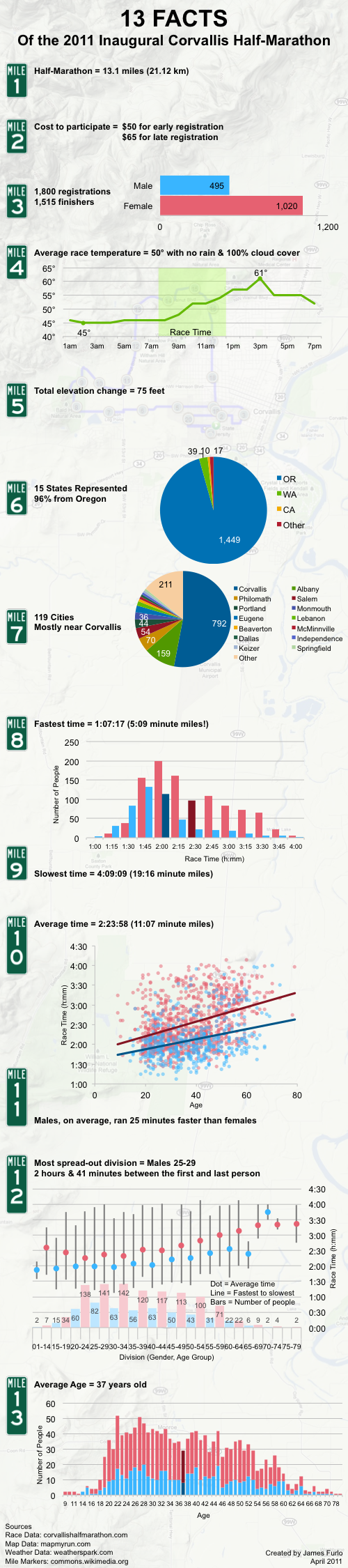
Corvallis 2011 Half-Marathon Infographic

Jessi and I participated in the inaugural Corvallis half-marathon this month. I saw the published results and thought something cool could be done with all that data. I've always enjoyed infographics, and wanted to try making one - this seemed like a perfect opportunity. So, here are 13 facts in honor of the 13 mile race.

(You can click the image to see it full-size and/or download it)


For those of you who like to know such things. I housed all the data in Excel (it was originally in a PDF, I'm so thankful for the text-column feature in Excel) and created views using a pivot table. I made the final charts in Excel and copied them into PowerPoint. I added my own comments and pictures - nothing too fancy. I saved the final slide as a PNG and uploaded it to my server. And now you're reading it somewhere in the world. Pretty neat!

Monday, April 18, 2011

Mysore Palace in India


I'm currently sitting in India while I write this - it's pretty exciting and I have many stories to share. At the very least, I would say that this has been an eye-opening experience. India is truly a different country than the US. Duh, I know. But it's even more different than I ever imagined. For a while I kept drawing parallels to my experience in Mexico, but it's even great than that! I will share much more later here, and feel free to call me to hear even more (when I get back).

In the mean time, here's one picture from Mysore Palace. We were able to take a tour of this place, and it was amazing. It's 2.5 hours Southwest of Bangalore, and totally worth the drive. We also visited a 1700 year old temple, which was quite an experience. Talking about faith to people in India is also completely different (because they believe in multiple gods). It didn't fully understand what that meant until we visited that temple.

Lastly, I've also learned all the rules to cricket. It's fun to watch once you understand what's going on.

Thursday, April 14, 2011

Dog Door

Last weekend Jessi and I visited a friend to look at some bikes he was trying to get rid of. While there we saw his dog door, which he said he couldn't fit through. I told Jessi I'd give her $20 if she could get through. Luckily, I was able to turn on my camera fast enough because she didn't wait to make sure my offer was genuine. So, enjoy the fun.


Friday, April 08, 2011

Visiting Home


This last week I got to go the Bay Area for work. As such, I got to hang out with my family for a bit. It was great seeing all of them in person. Thanks to everyone who changed up their schedules to make my trip a success - I really do appreciate it.

I do really miss the weather down there. It's just so amazingly beautiful. Thankfully, we're heading into summer, so Oregon is just starting to be nice as well.

So, until I see everyone again, I'll continue to video chat and call often. Thanks again!

Now I'm getting geared up for an even larger trip to India.